LangGraph Subgraphs 子图
本文最后更新于 2026年8月2日
未完待续
概述
子图,就是在另一个图中用作节点的图。langgraph支持将一个完整的图作为某个图的一个节点,适用于将复杂任务拆分为多个专业智能体协作完成,每个子图都可以独立开发,测试和复用。子图可以有自己的私有数据,也能和父图共享数据。对于主图来说,并不关心子图内部怎样处理,只关心输入和输出的State。
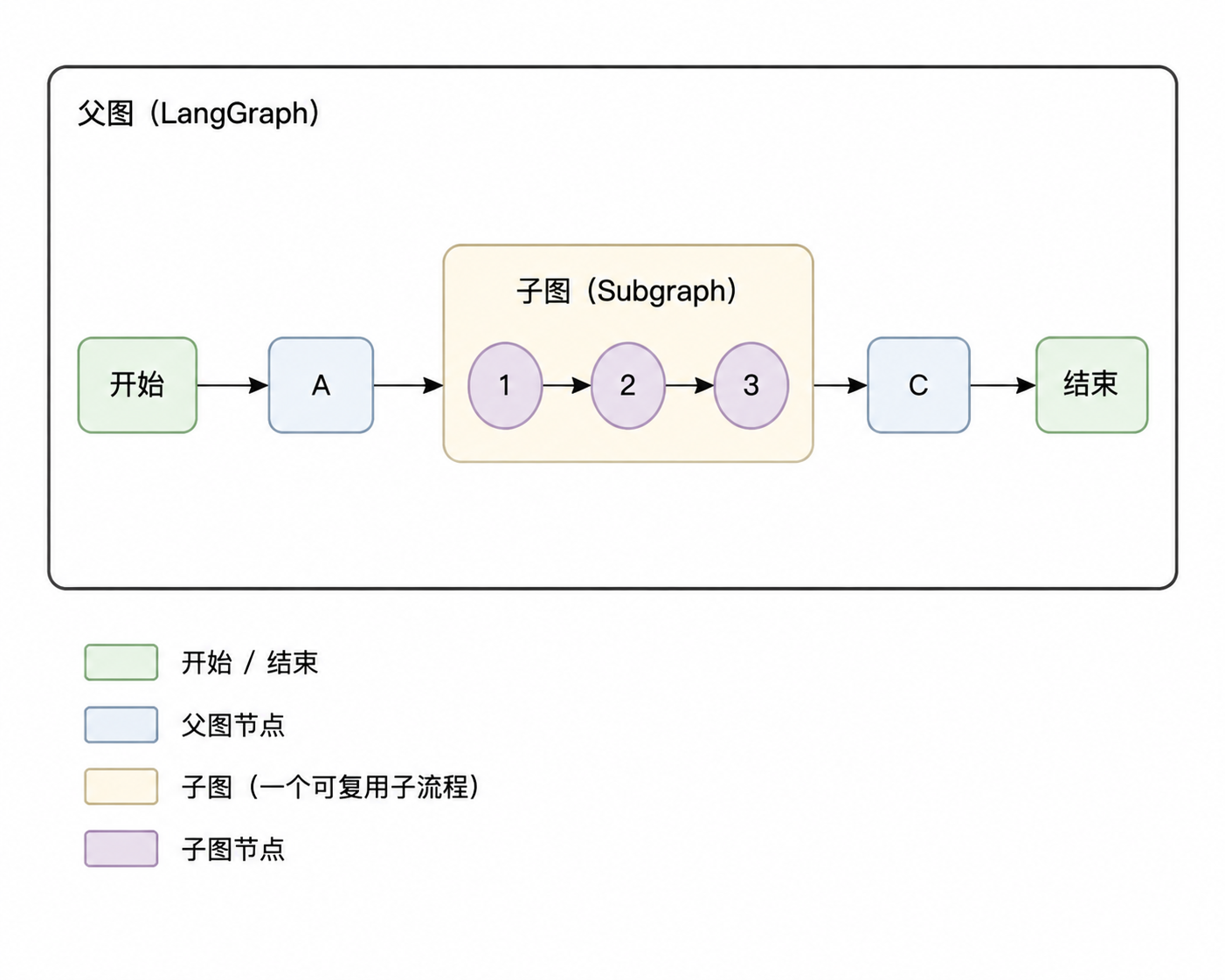
1.添加子图为节点
例:添加子图为节点
1..compile()编译后的子图sub_graph,才能作为节点放进父图master_graph
2.content='master graph'变成子图修改后覆盖的sub node
3.当主图调用子图,会发生状态的合并,因为operator.add是无条件叠加,所以子图收到初始的messages后,合并成['master graph invoke', 'sub node add']返给父图,父图还要和自己的状态做合并,于是会变成['master graph invoke', 'master graph invoke', 'sub node add']
import operator
from typing import TypedDict, Annotated

from langgraph.graph import StateGraph
from langgraph.constants import START
from langgraph.constants import END

# 状态
class DemoState(TypedDict):
    messages: Annotated[list, operator.add]
    content: str

# 子图节点
def sub_node(state: DemoState) -> dict:
    return {
        'messages': ['sub node add'],
        'content': 'sub node'
    }


if __name__ == "__main__":
    sub_builder = StateGraph(DemoState)
    sub_builder.add_node('sub_node', sub_node)
    sub_builder.add_edge(START, 'sub_node')
    sub_builder.add_edge('sub_node', END)
    sub_graph = sub_builder.compile() #构建子图
    sub_graph.get_graph().print_ascii()
    print('*' * 30)

    master_builder = StateGraph(DemoState)
    master_builder.add_node('sub_graph', sub_graph) #子图作为父图节点
    master_builder.add_edge(START, 'sub_graph')
    master_builder.add_edge('sub_graph', END)
    master_graph = master_builder.compile()
    master_graph.get_graph().print_ascii()
    print('*'*30)

    resp = master_graph.invoke(DemoState(
        messages=['master graph invoke'],
        content='master graph'
    ))

    print(resp)
+-----------+
| __start__ |
+-----------+
      *
      *
      *
+----------+
| sub_node |
+----------+
      *
      *
      *
 +---------+
 | __end__ |
 +---------+
******************************
+-----------+
| __start__ |
+-----------+
      *
      *
      *
+-----------+
| sub_graph |
+-----------+
      *
      *
      *
 +---------+
 | __end__ |
 +---------+
******************************
{'messages': ['master graph invoke', 'master graph invoke', 'sub node add'], 'content': 'sub node'}
2.从节点调用子图
从节点调用子图,子图和父图共享名称相同的State字段,父图的变量,子图可修改,子图也可拥有自己的私有字段,仅在子图内有效,父图中不会最终显示出来。
from typing import TypedDict

from langgraph.graph import StateGraph
from langgraph.constants import START
from langgraph.constants import END


class ParentState(TypedDict):
    # 字段名一致,父子共享
    parent_messages: str

class SubState(TypedDict):
    parent_messages: str
    # 子图私有
    sub_content: str

# 父图节点
def parent_node(state: ParentState) -> dict:
    return {
        'parent_messages': state['parent_messages'] + ' and parent_node msg ',
    }

# 子图节点
def sub_node(state: SubState) -> dict:
    return {
        'parent_messages': state['parent_messages'] + ' and sub_node msg ',
        'sub_content': 'sub node'
    }


if __name__ == "__main__":
    sub_builder = StateGraph(SubState)
    sub_builder.add_node('sub_node', sub_node)
    sub_builder.add_edge(START, 'sub_node')
    sub_builder.add_edge('sub_node', END)
    sub_graph = sub_builder.compile() #构建子图
    sub_graph.get_graph().print_ascii()
    print('*' * 30)

    master_builder = StateGraph(ParentState)
    # 父图自己的节点
    master_builder.add_node('parent_node', parent_node)
    # 子图作为父图节点
    master_builder.add_node('sub_graph', sub_graph)

    master_builder.add_edge(START, 'parent_node')
    # 父图自己的节点指向子图
    master_builder.add_edge('parent_node', 'sub_graph')
    master_builder.add_edge('sub_graph', END)
    master_graph = master_builder.compile()
    master_graph.get_graph().print_ascii()
    print('*'*30)

    resp = master_graph.invoke(ParentState(parent_messages='graph invoke'))

    print(resp)
+-----------+
| __start__ |
+-----------+
      *
      *
      *
+----------+
| sub_node |
+----------+
      *
      *
      *
 +---------+
 | __end__ |
 +---------+
******************************
 +-----------+
 | __start__ |
 +-----------+
        *
        *
        *
+-------------+
| parent_node |
+-------------+
        *
        *
        *
 +-----------+
 | sub_graph |
 +-----------+
        *
        *
        *
  +---------+
  | __end__ |
  +---------+
******************************
{'parent_messages': 'graph invoke and parent_node msg and sub_node msg '}"如果文章对您有帮助,可以请作者喝杯咖啡吗?"

微信支付

支付宝
LangGraph Subgraphs 子图
https://blog.liuzijian.com/post/2026/07/26/langgraph-subgraphs/