使用Certbot自动续签HTTPS证书
1.关于ACME
使用https加密是网站安全的必要条件,也是当前网站的标配,很多浏览器都已经默认发起https的请求,如网站不支持还会提示访问不安全。
但是https证书签发需要收费,对于一些小型组织和个人站长来讲也是一笔不小的费用,不过某些CA机构推出了公益性的免费证书计划,让小网站也实现免费的https加密,比如Let’s Encrypt(https://letsencrypt.org/zh-cn/getting-started/)就是目前全球规模最大、最具影响力的公益属性CA之一。但是因为小站更容易被攻击或管理不善导致发生私钥泄露进而使网站存在风险,各个公益性组织免费签发的证书寿命越来越短,从1年到半年再到3个月,2025年有的组织又压缩到一个半月,用频繁强制换新的方法来避免私钥一旦泄露网站会长期存在风险的问题,但这也对一些小网站的运维产生了不便,因为频繁手动更换证书非常麻烦。
现在可以通过ACME协议解决这个问题,实现自动续期证书,ACME是一套通信协议,规定了你的服务器(ACME客户端)和证书颁发机构(CA)之间,如何自动化地申请、验证、签发和续期证书。ACME流程大致是这样:ACME客户端先向CA机构申请证书,CA机构返回一个测试记录,要求ACME客户端将记录写入域名对应DNS记录或网站某个路径下证明其是域名的主人,ACME客户端完成后告诉CA机构已经完成验证,CA机构的服务器会去访问DNS记录或网站路径验证是否有测试记录,如有,则签发证书返回给ACME客户端。
事实上一些公益组织也不支持站长在其官网下单提交请求再下载证书,而是必须通过ACME客户端签发,Let’s Encrypt就是这样的。
2.使用Certbot申请证书
2.1 流程
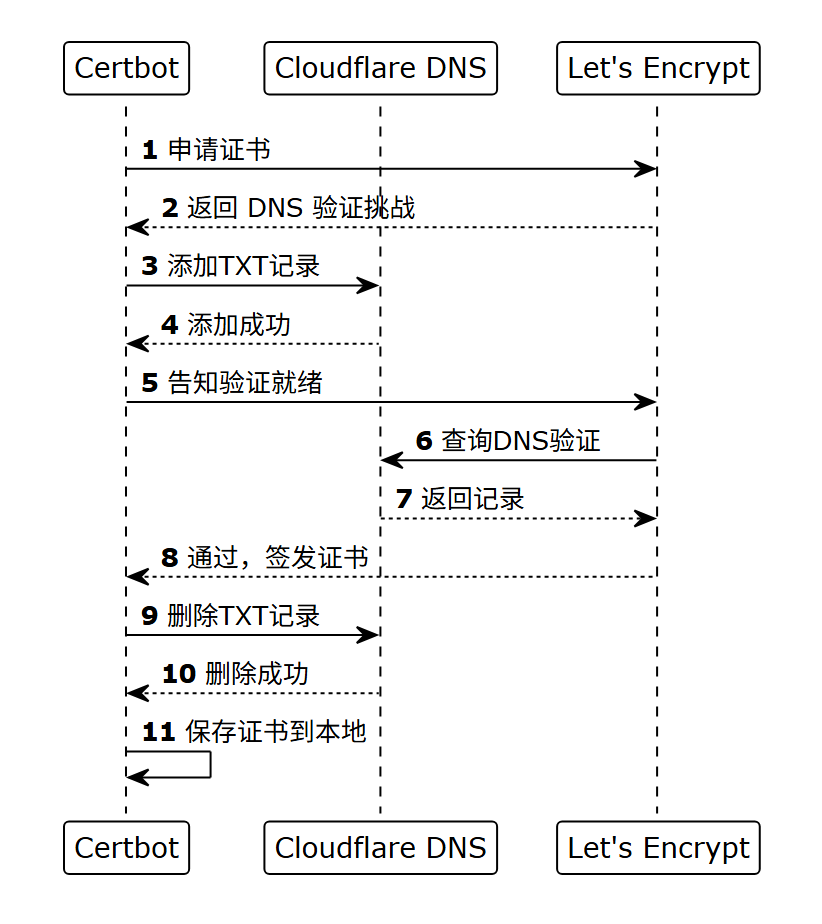
Certbot(https://certbot.eff.org/pages/about),就是一个遵循了ACME协议的工具,而且默认对接的就是Let’s Encrypt,可以用它实现自动签发和续期免费证书,这里使用Certbot配合Cloudflare DNS演示基于DNS记录的域名持有者验证,大致流程是:
Certbot先向Let’s Encrypt申请证书,Let’s Encrypt返回一个测试令牌,要求将测试令牌写入域名对应TXT DNS记录证明其是域名的主人。
Certbot将Let’s Encrypt返回的令牌通过调用Cloudflare API,写入到对应域名的TXT DNS记录,完成后告诉Let’s Encrypt已经添加了测试记录。
Let’s Encrypt会去访问该域名的DNS记录验证是否有对应的测试令牌,如有,则签发证书返回给Certbot。
除了Cloudflare外,Certbot也支持很多其他知名DNS服务商,详见:https://eff-certbot.readthedocs.io/en/stable/using.html#dns-plugins
Certbot设置好后,整个过程可以全流程自动完成。
2.2 具体操作
以Certbot配合Cloudflare为例
1.安装certbot和certbot的cloudflare插件,以rocky linux为例
yum install -y certbot python3-certbot-dns-cloudflare2.要申请一个Cloudflare API KEY,在https://dash.cloudflare.com/profile/api-tokens,使用“编辑区域DNS”模板,并设置对应域名的DNS编辑权限,然后签发一个API KEY
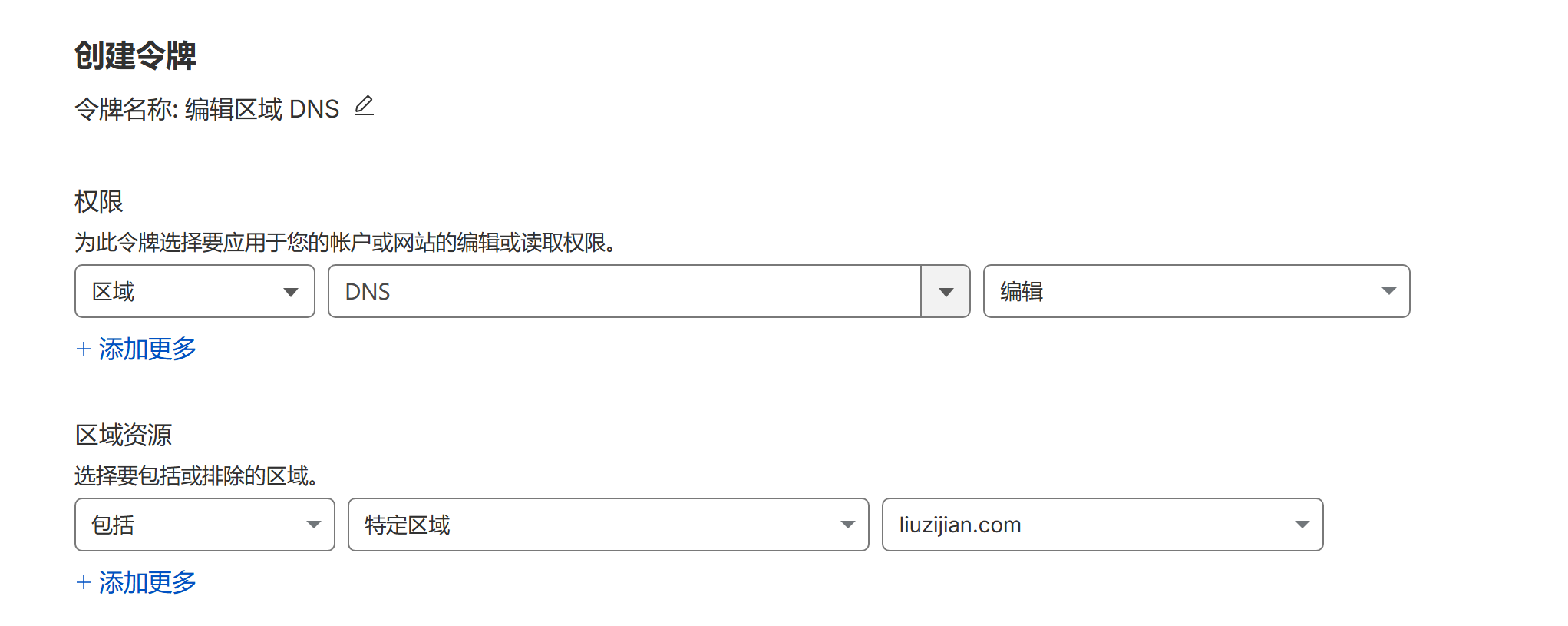
mkdir -p /etc/letsencrypt/secrets/,sudo vim /etc/letsencrypt/secrets/cloudflare.ini,将API KEY配置在对应配置文件中,然后设置配置文件权限
dns_cloudflare_api_token = **************chmod 600 /etc/letsencrypt/secrets/cloudflare.ini然后执行certbot certonly命令首次签发证书
--email直接指定邮箱,不会弹出询问--agree-tos自动同意服务条款--no-eff-email不分享邮箱给 EFF--non-interactive全程不询问任何问题-d liuzijian.com -d *.liuzijian.com为liuzijian.com/*.liuzijian.com签发
certbot certonly \
  --dns-cloudflare \
  --dns-cloudflare-credentials /etc/letsencrypt/secrets/cloudflare.ini \
  -d liuzijian.com \
  -d *.liuzijian.com \
  --email me@liuzijian.com \
  --agree-tos \
  --no-eff-email \
  --non-interactive
成功后会返回日志以及证书私钥位置等信息
Saving debug log to /var/log/letsencrypt/letsencrypt.log
Requesting a certificate for liuzijian.com and *.liuzijian.com
Waiting 10 seconds for DNS changes to propagate

Successfully received certificate.
Certificate is saved at: /etc/letsencrypt/live/liuzijian.com/fullchain.pem
Key is saved at:         /etc/letsencrypt/live/liuzijian.com/privkey.pem
This certificate expires on 2026-08-15.
These files will be updated when the certificate renews.
Certbot has set up a scheduled task to automatically renew this certificate in the background.

- - - - - - - - - - - - - - - - - - - - - - - - - - - - - - - - - - - - - - - -
If you like Certbot, please consider supporting our work by:
 * Donating to ISRG / Let's Encrypt:   https://letsencrypt.org/donate
 * Donating to EFF:                    https://eff.org/donate-le
- - - - - - - - - - - - - - - - - - - - - - - - - - - - - - - - - - - - - - - -证书由certonly申请后,以后都可以使用certbot renew命令续签证书,执行后会先检查,有效期不足30天才会真的续签
certbot renew--dry-run参数可以演练签发,CA机构验证DNS通过,只会告诉certbot通过验证,不会真的签发证书
certbot renew --dry-run还可以:
--cert-name liuzijian.com只续签某个域名的--force-renewal参数可实现不到30天也要强制续签,续签数量有限制,短时间内不能超过一定数额
可通过定时任务不断调用certbot renew实现每天或每周检查,快过期了则续签并刷新nginx,最终实现我们想要的效果
--quiet只输出错误信息--post-hook "systemctl reload nginx"成功后触发
certbot renew --quiet --post-hook "systemctl reload nginx"当然,生成的证书和私钥需要你自己指定到nginx 😜
"如果文章对您有帮助,可以请作者喝杯咖啡吗?"

微信支付

支付宝